
Preparations on the Server
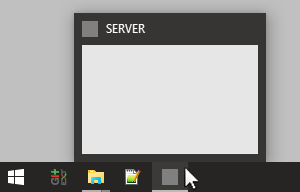
On the server start vvvv with the following Commandline Parameters:
vvvv.exe /server
Note that vvvvs button in the taskbar now displays SERVER to indicate its mode.
If your server PC has more than one network adapter that are assigned to different networks you need to specify which one to use for the udp broadcasts. You do this via the (hidden) Broadcast IP on the Boygroup (VVVV Server) by specifying a broadcast address on the subnet you want the boygroup to operate on, like: 192.168.178.255 (ie. with the last byte set to 255).
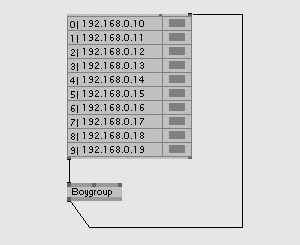
To tell the server which clients it has to deal with, create a Boygroup (VVVV Server) node. To the Clients of this node connect a spread of IP-addresses of all your clients.
Note that the Boygroup nodes' output carries a spread of booleans indicating the connected-state of the individual clients. If everything is setup correctly a few seconds (<10) after starting the clients they should show up as being connected.
note:
If you don't get a connection the first thing you should try is to disable the firewall on the server/clients or define a rule to allow vvvv and/or the ports it uses for boygrouping through the firewall.