
Boygroup Patching
The blue nodes
On a vvvv instance running in server-mode the keyboard-shortcut CTRLB allows you to boygroup individual nodes.
Boygrouped nodes are dipped in blue which indicates that they have been mirrored to the clients (even if you can't see them there) and are now being calculated over there.
See the Colors of Nodes.
Usually you would start with boygrouping a Renderer and then look upstream and decide what else needs to be boygrouped. Most notably make sure to always have both nodes that are connected via a node-connection (like transforms, textures, audio, video, layers,...) boygrouped because those connections are not being transmitted automatically.
What to Boygroup?
There is no general rule like "boygroup manually as much you can" or "less boygroup is good boygroup".
Instead be aware that all data running on connections between boygrouped (blue) and normal (gray) nodes is being transferred over the network every frame (only if they are changed, of course).
Therefore you should take care of those connections not to carry too high spreadcounts and rather boygroup nodes that create spreadcounts.
Lets have a look at 3 different boygrouping scenarios you'll be confronted with while patching:

The sending node (gray) exists only on the server while the receiving node (blue) is on the client.
Now as they change all values are transmitted via UDP every frame. As UDP can not guarantee a fixed data rate or latency, you will notice a small delay or roughness in the animation of your objects. With animation parameters being transmitted from server to clients it is therefore good practice to have a boygrouped Damper (Animation)as the first node on a client.
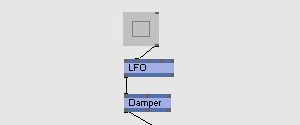
Both nodes exist on the client.
Here no data is transmitted. The nodes on the client have connected locally (on the clients) and data is transferred internally. So you will get smooth animations as usual.

The sending node (blue) is boygrouped while the receiving node (gray) is not.
Here no data is transmitted. On the server you will always see the values which were locally calculated but nothing happens on the clients. A scenario like this typically does not make sense.
Finding the best nodes to boygroup takes a bit of practice but in general you can't do much wrong. If your results are slow or jerky try boygrouping different nodes or spend your animations a blue Damper (Animation) node.
Bridges
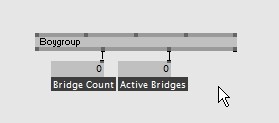
Bridges are connections between gray and blue nodes, ie. links that transmit data via the network.
The BoyGroup (VVVV Server) node has two outputs that give you informations about Bridges
- Bridge Count
- Active Bridges
Active bridges are those transmitting data in exactly this frame.
The display of the bridges is mainly for debug purposes. It helps you roughly understand how many connections there are transmitting data. Typically you want to keep them at a low count.
Warnings
If the BoyGroup (VVVV Server)'s Warning pin outputs something like
msg too big for UDP;
was sent via TCP: /4/14/139/ Scale XYZ
means:
/4/14/139
is the path to the pin
Scale XYZ
given in node-ids as seen from the ROOT.
Like this you can identify the location in your patch where this too big message had to be sent via TCP and check if it is really necessary like this or if you can improve your patch.
The reason for this warning is that vvvv by default won't risk to fragment UDP packages and thus keeps them under the MTU size which seems to default to 1472 bytes but may vary on different network/hardware setups.
To check for the mtu size on your setup open a console on your server and ping one of the clients like so:
ping 192.168.2.104 -l 1472 -f
This should not return any error. Now increase that 1472 number and see when you get an error mentioning fragmentation. If you find a number different to 1472 that works for you, you can safely set that via the Maximum UDP Packet Size on Boygroup (VVVV Server) and vvvv will only switch to TCP for messages larger than that.
Now you can even increase the Maximum UDP Packet Size if the ping test fails for higher numbers. Just be aware that this increases the chances for packet loss which may (depending on the needs of your project) not be a problem at all and gain you some performance.
ClientID
So far all clients would really always do everything in complete sync which isn't of much use.
Consider Justin, Lance, JC, Joey and Chris performing their dancemovements all at the very same position on stage. While this would cause interesting artefacts it just wouldn't work in our limited 3 dimensions.
Therefore boygrouping introduces a ClientID which is the only feature that lets you distinguish between the clients (and indeed the server) from a patchs view.
The Boygroup (VVVV Client) node returns a different ID from 0 up to ClientsCount – 1 on each client. The order depends on the spread of IP-addresses you entered on the Boygroup (VVVV Server) node. IP in slice 0 will be ClientID 0, IP in slice 1 will be ClientID 1 and so on.
Note that on the server Boygroup (VVVV Client) returns whatever value you set on its ServerID input and whatever value you choose for the ServerID has no effect on the clients. Changing the ServerID simply lets you simulate any of the clients on the server.
This example shows the Boygroup (VVVV Client) in action, it sets the camera to a different offset on each client:
- girlpower\Boygrouping\takethat.v4p